Manual Pentesting VS. Automated Scanners: The Real Gap

About the Author

Ahmar Imam wrote this article, drawing on over a decade of combined experience in application security, threat intelligence, identity protection, and incident response. Ahmar is a founder of D3C Consulting, where his team monitors emerging attack campaigns daily and works directly with enterprise security teams and individual consumers to mitigate data breach risks.

Reviewed by: Senior Threat Intelligence Analyst | Certified Information Security Professional (CISSP) | Identity Management expert

Introduction

Custom app manual pentesting? What is it? why it is so important. Let’s dig into it.

When it comes to custom app security, many companies get SOC 2 and ignores about manual pentesting of that custom code totally . You built your own application. Not a template. Not a reseller product. Real, custom code that runs your business or your client’s business.

Now it is time to test its security. So you ran a scanner. It came back clean. There were green checkmarks everywhere. But something feels off, and you don’t exactly know what it is.

Then a customer’s security team asked a question your scan report can’t answer, or you start doubting the scanner. You suspect it didn’t look at your login flow the way an attacker would.

You’re right to be uneasy. Here’s why

Split screen showing a clean automated security scan passed result on the left and a magnified custom app manual pentest code review revealing a potential SQL injection on the right.

Why Do Automated Scanners Fall Short?

Scanners are built to recognize patterns. They check your code and traffic against a list of known vulnerability signatures: SQL injection, cross-site scripting, missing headers.

That works well for common, repeatable flaws. It fails for anything unique to your application.

Your app is built on custom code, which isn’t common. Your auth flow, business rules, and API sequencing don’t match a signature in any scanner’s database. Someone needs to check it for all the possible vulnerabilities. A custom app manual pentesting is the only way to make sure that hackers cannot go through any loophole. A tool can’t flag a problem it has never been trained to recognize.

The Pattern-Matching Problem

Scanners are all about detecting and matching patterns. They are just like a spell-checking app. They catch typos, but cannot catch grammatical errors.

The same goes for your applications. Application security scanners can pass every technical check and still let an attacker pass through because it was not contrary to the predesigned pattern.

What Do Scanners Actually Miss?

The things scanners miss are not a minor gap. It’s the fastest-growing risk category in application security right now. Custom app manual pentesting is the only way to avoid it.

A 2026 analysis of nearly 5,000 real-world security engagements and over half a million findings found that attackers are increasingly moving into places automated tools were never built to look: application workflows, cloud configuration, and business logic. Findings tied to insecure design and business logic flaws climbed from 8% to 16% of all web application findings in a single year, making it the defining trend in how applications get breached.

The same report found broken access control remains the most common critical finding at 27%. Both categories share one trait: they require human reasoning to identify, because they come from how an application behaves, not just whether a security control exists.

Chart displaying business logic vulnerability findings doubling from 8% in 2025 to 16% in 2026, alongside a pie chart showing Broken Access Control as 27% of critical web app findings.

Business Logic Flaws Explained

A business logic flaw isn’t broken code. It’s code that works exactly as written, built on an assumption that turns out to be wrong.

The code functions correctly from a programming perspective. Functions execute without errors. Security controls activate as designed. Yet the application still enables an action that violates a business rule or creates a consequence nobody intended.

A scanner can tell you whether input looks suspicious. It cannot judge whether a user should be able to stack discounts, reach another customer’s records, or skip a step in a checkout flow.

OWASP puts it plainly: these flaws “cannot be detected by a vulnerability scanner” and demand human-led testing.

Why Does Custom Code Raise the Attack Risks?

If you’re building on AWS, Azure, or GCP, you’re not just shipping features. You’re shipping a unique attack surface.
Off-the-shelf SaaS products get tested once by a vendor, and every customer inherits that report. Your application doesn’t have that safety net. Nobody has tested your code, but you and your own team can’t see its blind spots. Developers test for what they expect users to do. Attackers test for what they can get away with.
If you build client-facing software under contract, this gap becomes contractual risk. Your client’s due-diligence process wants proof tied to the app you built, not a generic vendor letter that says nothing about your code.

What Happens After a Scanner Says “Safe”?

A clean scan report can create a false sense of security, and that’s more dangerous than knowing you have a problem.

Organizations take an average of 74.3 days to remediate a critical application vulnerability, and large enterprises leave 45.4% of discovered vulnerabilities unresolved after twelve months. Now add the flaws that never got discovered at all, because nothing was ever looking for them.

Here’s what a scanner-only approach usually costs you:

  • A breach that traces back to a flaw nobody flagged. The report said “clean,” but the attacker found the gap anyway.
  • A stalled enterprise deal. A customer’s security questionnaire asks for independent testing on your specific application. A scan report doesn’t satisfy that.
  • A compliance audit that fails on generic evidence. Auditors want proof someone tested your logic, not just your ports.
  • A retest cycle that never actually confirms the fix. Automated tools rescan for the same signatures. They can’t confirm a logic fix holds under new conditions.

None of this shows up until you look for it.

How Does Manual Pentesting Close the Gap?

Penetration testing simulates a real adversary. A tester validates exploitability, chains weaknesses across systems, and demonstrates business impact, instead of just reporting that a vulnerability might exist.
A human tester reads your auth flow the way an attacker would. They try your API out of sequence. They ask what happens if a user does something you didn’t expect, then they actually try it.
That’s the work no scanner script can replicate. Good testing means trying the same action under different identities and permission levels to see whether the control actually holds, not just whether one request came back clean.

Promotional graphic contrasting automated scanner dashboard reports with custom app manual pentesting source code analysis.

Scanners and Manual Testing Aren’t Rivals

To be fair, scanners aren’t useless. They’re fast and cheap for catching known, patchable issues at scale. The real answer isn’t scanner versus tester. It’s knowing which one your situation actually needs.

If you resell a multi-tenant SaaS product, your vendor’s annual pentest report already covers you. You don’t need this.

But if you build proprietary applications, internal tools, or client-facing software on your own code, that report doesn’t exist yet. Someone has to test the thing only you built. That’s manual pentesting’s job, and it’s not optional once your code is the product.

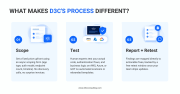
What Makes D3C’s Process Different?

D3C Consulting built its application pentest around one idea: test the code your team actually wrote, not a templated checklist.

  • A Fixed Price Before You Talk to Anyone: You get a price from an async scoping form: your app, your auth model, your endpoint count, your timeline. No discovery-call runaround. No surprise invoices later.
  • Manual Testing on Your Actual Code: A human tester works through your authentication flows, business logic, and APIs on AWS, Azure, or GCP. This isn’t a rebranded scan. It’s the work a scanner structurally cannot do.
  • A Report Your Engineers Can Use: Findings get mapped to your specific fixes. Every engagement includes a free retest window once your team ships changes, so you get confirmation the fix actually holds.

D3C Consulting also works white-labeled with agencies, dev shops, and cloud consultancies that build custom software for clients. You keep the client relationship. D3C plugs in as the testing arm behind the scenes.

Graphic detailing D3C Consulting's three-step custom app manual pentest methodology: Scope, Test, and Report + Retest.

Who Actually Needs Manual Pentesting?

You’re a fit if any of this sounds like your team:

  • You build proprietary applications, internal tools, or APIs on AWS, Azure, or GCP.
  • You build client-facing software under contract and need an independent test tied to that specific deliverable.
  • An enterprise customer’s due diligence process is asking about the app you built, not a vendor you resell.
  • You ship frequently and need testing that keeps pace with releases, not a once-a-year checkbox.

If none of that applies, and you’re just reselling a shared SaaS platform, save your budget. This service isn’t built for you.

Checklist outlining four key reasons organizations require a custom app manual pentest, including proprietary apps, contract deliverables, enterprise due diligence, and continuous deployment.

How Do You Get Started This Week?

Start by finding out what “ready” actually looks like before you pay anyone. D3C’s free Custom Code Pentest Readiness Checklist walks through the 15 questions engineering leads use before a client review or a security questionnaire.

From there, the async scoping form gets you a fixed price with no call required. If you want to talk first, that call exists to confirm scope, not to sell you.

Your scanner already told you what it can see. It’s time to find out what it can’t.

Get a fixed-price quote →

Summary
Automated Scanners vs Manual Pentesting: The Real Gap
Article Name
Automated Scanners vs Manual Pentesting: The Real Gap
Description
Automated scanners miss the flaws in your custom code. See what manual pentesting catches instead, and how to get a fixed-price test done right.
Author
Ahmar Imam
Publisher Name
D3C Consulting
Publisher Logo

Leave a Comment

Your email address will not be published. Required fields are marked *

Scroll to Top